
SEO client reporting has one job: help the client decide to keep paying you. Not by showing more charts, but by answering three questions they actually have.
- Is it working?
- What did you do?
- What happens next?
We report to clients on SEO work every month, and we built Vistobi partly to cut the time it takes to prepare those answers across many sites. This guide is the structure we use and recommend, plus what to automate.
Why most SEO reports go unread
- Too long. Twenty pages of exported charts. The client reads page one, if that.
- Wrong metrics first. Rankings for 300 keywords, before a word about clicks, leads or sales.
- No story. Numbers without the reason they moved.
- No next step. The client cannot tell what you will do with their money next month.
If your report needs a call to explain it, it is not a report yet.
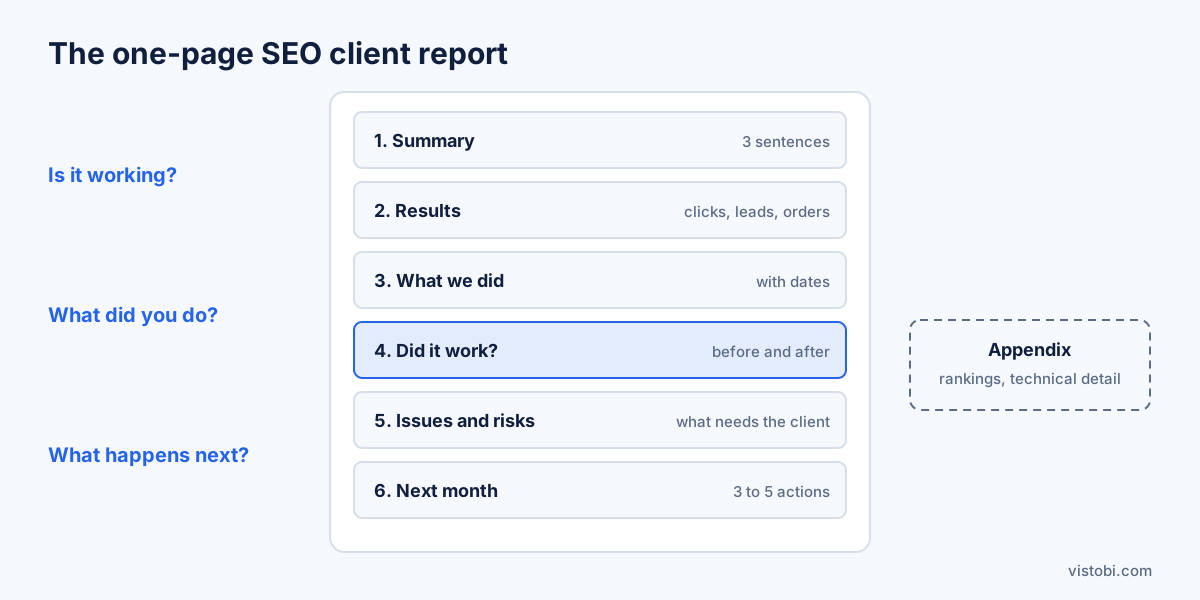
The one-page SEO client report template
1. Summary (three sentences)
What happened, why, and what you will do next. For example: “Organic clicks to category pages grew after the title rewrites in week 2. The blog is flat because two articles slipped to next month. Next month we finish the remaining category pages and publish the two articles.”
2. Results the client cares about
| Metric | Source | Why it is here |
|---|---|---|
| Organic clicks | Google Search Console | Real visits from search, not estimates |
| Leads or orders from organic | GA4 or the store | What the client is paying for |
| Impressions | Search Console | Early signal before clicks follow |
| Key pages: clicks this month vs last | Search Console | Shows where change happened |
Compare against the previous period and, if seasonal, the same month last year. Show the change, not only the number.
3. What we did
A short list with dates: pages changed, articles published, technical fixes, Google Business Profile work. Dates matter, because they let you connect a change to a result.
4. Did it work? Before and after
For each important change, compare the page's clicks for the same number of days before and after. This is the most convincing part of any SEO report, and the part most reports skip.
5. Issues and risks
Anything that needs the client: content to approve, a developer task, a decision. Keep it to what they must act on.
6. Next month
Three to five planned actions, in priority order, with the reason for each.
7. Appendix (optional)
Rankings, technical details, full keyword lists. For the client's SEO-literate colleague, not for the decision-maker.
Which SEO metrics to report, and which to leave out
| Report | Leave out or move to the appendix |
|---|---|
| Organic clicks and their trend | Domain authority scores |
| Leads, orders or revenue from organic | Hundreds of keyword positions |
| Before and after for changed pages | Total backlinks without context |
| Impressions for key pages | Raw crawler error counts |
| AI answers: is the brand mentioned? | Vanity charts nobody asked for |
AI visibility is now worth a short line. Clients increasingly ask whether ChatGPT or Gemini mention them. A sentence like “mentioned in 4 of 10 buyer questions, up from 2” answers that before they ask.
How often to report
- Monthly: the one-page report above.
- Weekly (optional): a three-line email for active projects or migrations.
- Quarterly: a review call with the trend, what you learned, and the plan for the next quarter.
SEO client reporting tools
| Tool type | Examples | Strength | Weakness |
|---|---|---|---|
| Free dashboards | Looker Studio | Free, flexible, client-branded | Setup time; shows data, not decisions |
| Reporting platforms | AgencyAnalytics, DashThis | White-label reports, many integrations | Answer what happened, not what to do |
| SEO suites | Semrush, Ahrefs, SE Ranking | Rankings and audits in reports | Heavy on SEO metrics clients do not read |
| Prioritising assistants | Vistobi | What changed and what to do next, per client | No white-label PDF export |
Many agencies use two layers: a reporting tool for the branded monthly PDF, and a working tool that tells the team what to do and supplies the “what we did” and “next month” sections.
Where Vistobi fits for agencies
Vistobi is the working layer, not a report designer. It reads each client's own Search Console and GA4 data and, on the Agency plan, gives you:
- A portfolio dashboard with every client site in one place, and cross-client prioritisation, so you know which client needs you today.
- A Portfolio Morning Brief: a short daily summary of what changed across clients.
- Before and after comparisons for changed pages, which become section 4 of your report.
- AI answers checks with up to 20 buyer questions per check, for the AI visibility line.
- A results and report archive, so past checks and changes are saved with their dates.
- Team roles and approvals (beta), so juniors prepare and seniors approve.
What it does not do: it does not produce white-label PDF reports. If your clients expect a branded PDF, keep Looker Studio or a reporting platform for that, and use Vistobi to fill it with decisions.
The Agency plan is €249 a month for up to 10 websites and 10 internal users, with extra websites at €19 a month each, a 7-day free trial and a 14-day money-back guarantee. See the plan comparison.
If you would rather hand the SEO work itself to a partner, Somos Media also works as a white-label SEO team for agencies.
SEO client reporting checklist
- One page first: summary, results, what we did, did it work, risks, next month.
- Clicks and leads or orders before rankings.
- Every change listed with a date.
- Before and after for important changes.
- One line on AI visibility.
- Three to five next actions with reasons.
- Rankings and technical detail in the appendix.
Key takeaways
- A client report should answer: is it working, what did we do, what is next.
- Lead with clicks and business results; move rankings to the appendix.
- Before and after comparisons are the most convincing evidence you have.
- Separate the branded report from the tool that decides the work.
Related reading: best SEO tools for agencies, SEO dashboard software and SEO monitoring: what to check daily, weekly and monthly.