
SEO monitoring means noticing problems and opportunities on your website before they cost you traffic. Most teams either check nothing until traffic drops, or open five dashboards every morning and still miss the one thing that mattered.
We run our own webshops under the Melini brand in four countries, an international store for custom shin guards in 24 languages, and DogDietLab, an app in 24 regional versions. Watching all of that by hand is how Vistobi started: the weekly routine for the four Melini stores was the first thing we automated. This guide is that routine, written down.
What SEO monitoring should catch
| Problem | Why it matters | How fast you need to know |
|---|---|---|
| Pages dropping out of the index | No index, no traffic | Within days |
| robots.txt or noindex mistakes after a release | Can hide the whole site | Same day |
| Sitemap errors | New pages are found slowly | Within a week |
| Titles and descriptions broken or duplicated | Fewer clicks for the same rankings | Within a week |
| Clicks falling on important pages | Revenue follows | Within a week |
| Pages ranking but getting few clicks | The cheapest wins in SEO | Monthly |
| Two pages competing for the same query | Both rank worse | Monthly |
| Competitors publishing or changing pages | Early warning | Monthly |
| Product feed errors (stores) | Products disappear from Shopping | Within days |
The routine
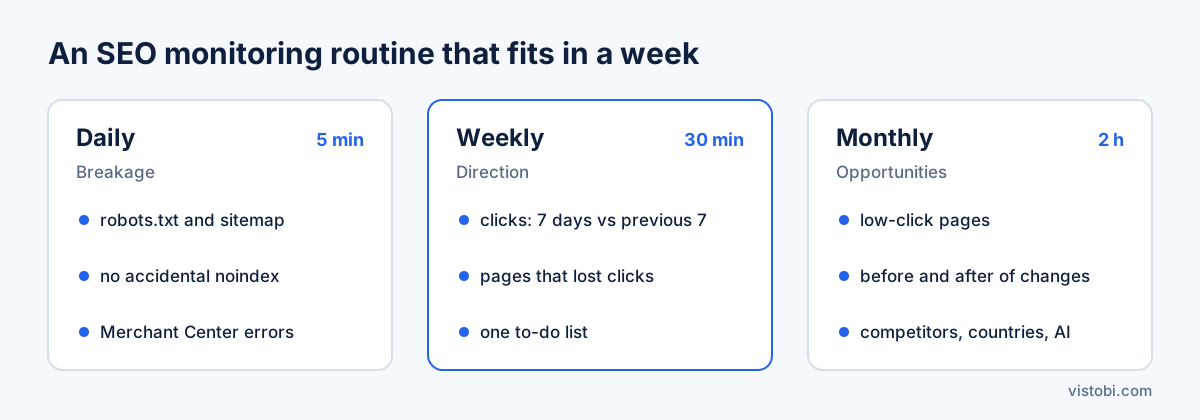
Every day: five minutes
The daily check is about breakage, not performance.
- Did anything stop working? robots.txt, sitemap, HTTPS, the main pages loading.
- Did a release change titles, canonicals or noindex tags by accident?
- For stores: are products being rejected in Google Merchant Center?
If nothing broke, you are done. Do not read daily rankings as performance. Positions move every day for reasons that have nothing to do with your site. Our guide on daily rank tracking explains when daily position data is worth it.
Every week: thirty minutes
The weekly review is about direction.
- Search Console clicks and impressions, last 7 days against the 7 before, for your most important pages.
- Which pages lost clicks, and did their position or their click-through rate change?
- What did you change last week, and is there an early signal?
- One short list of what to do this week.
This is the review that grew into Vistobi. Four stores meant four Search Console accounts, four Merchant Center feeds and four sets of rankings every Monday.
Every month: two hours
The monthly review is about opportunities.
- Pages with many impressions and few clicks: rewrite titles and descriptions.
- Keyword cannibalisation: two pages ranking for the same query.
- Before and after: did the pages you changed a month ago gain clicks?
- Competitors: new pages, new topics, changed prices or positioning.
- Country performance, if you sell in several markets.
- AI answers: do ChatGPT and Gemini mention you for your main buyer questions?
What an SEO monitoring tool should automate
A good SEO monitoring tool removes the opening-dashboards part and leaves you the deciding part. When you compare tools, check these:
- First-party data. It reads your own Google Search Console and Analytics, not only third-party estimates.
- Technical checks on a schedule. Titles, descriptions, robots.txt, sitemap, indexing basics.
- Alerts on meaningful changes only. A sustained drop on an important page, not every wobble.
- A short to-do list. Ordered by impact, with the reason next to each item.
- Before and after. It compares clicks on a page before and after you changed it.
- Multi-site view. If you run several sites or stores, one place for all of them.
- History. Past checks and reports saved, so you can see what changed and when.
The best SEO monitoring tools, by type
| Type | Examples | Good at | Gap |
|---|---|---|---|
| Google's own tools | Search Console, GA4 | Real clicks, indexing, free | Raw data, no priorities, one property at a time |
| Crawlers | Screaming Frog, Sitebulb | Deep technical audits | Run on demand; findings need interpretation |
| All-in-one suites | Semrush, Ahrefs, SE Ranking | Site audits, rankings, competitors | Large, priced for SEO specialists |
| Change monitors | Page change trackers | Catching unexpected edits | Do not tell you whether the change mattered |
| Prioritising assistants | Vistobi | One daily list built from your own data | Less raw research depth than a suite |
Most small teams need Search Console plus one tool that turns its data into a list. Specialists add a crawler and a suite.
Where Vistobi fits
Vistobi connects to your Google Search Console and Google Analytics, and for stores to Merchant Center. After that:
- SEO checks run on titles, meta descriptions, robots.txt and the sitemap, and flag keyword cannibalisation and low-click pages.
- Alerts on meaningful changes and a Morning Brief tell you what moved.
- The Today page lists what to fix, with prepared titles, descriptions and text for your approval.
- Before and after: when you change a page, Vistobi compares its Search Console clicks for the same number of days before and after.
- Competitors and site health, country performance on paid plans, and AI answers from ChatGPT and Gemini sit in the same place.
- A weekly email summarises the week.
Limits, honestly: position intelligence is in beta, and backlink monitoring is limited on every plan. If backlinks are central to your SEO, keep a suite for that.
The free plan covers one website with GA4 and Search Console, SEO checks and the Morning Brief. Paid plans start at €49 a month, with a 7-day free trial. If you only want a first look, run your homepage through the free SEO checker.
SEO monitoring checklist
Daily: robots.txt, sitemap and key pages load; no accidental noindex; Merchant Center errors.
Weekly: clicks and impressions on key pages, 7 days vs previous 7; what lost clicks and why; one to-do list.
Monthly: low-click pages, cannibalisation, before and after of last month's changes, competitors, countries, AI answers.
Key takeaways
- Daily monitoring is for breakage, weekly for direction, monthly for opportunities.
- Use your own Search Console data as the backbone; rankings are a signal, clicks are the result.
- Alert on sustained changes to important pages, not on every movement.
- Measure every change you make with a before and after comparison.
- Choose a tool that ends with a short list of what to do, not another dashboard.
Related reading: SEO dashboard software, SEO automation: what we automate and what we do by hand and the free SEO audit checklist.