
In short
Hreflang tags tell Google that several pages are the same content for different languages or countries, and which one to show to whom. Without them, a German searcher may land on your English page, or your UK and US pages may compete with each other.
Hreflang is simple in theory and easy to break in practice. We set it up on multilingual sites such as Agrider (5 languages, about 410 machine pages each) and on our own site in four languages, and we check it after every larger release. This guide is the practical version.
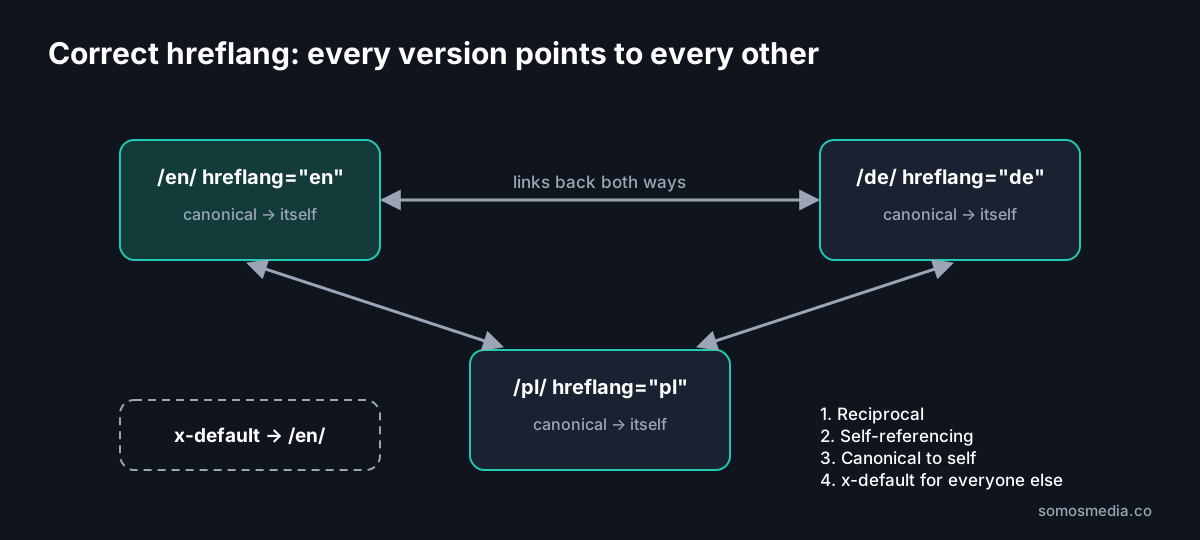
What a correct hreflang setup looks like
Each page lists every language version, including itself, plus an x-default for visitors who match none of them:
<link rel="alternate" hreflang="en" href="https://example.com/en/leasing-calculator/" />
<link rel="alternate" hreflang="de" href="https://example.com/de/leasingrechner/" />
<link rel="alternate" hreflang="pl" href="https://example.com/pl/kalkulator-leasingu/" />
<link rel="alternate" hreflang="x-default" href="https://example.com/en/leasing-calculator/" />
<link rel="canonical" href="https://example.com/en/leasing-calculator/" />
The same block, with its own canonical, goes on the German and Polish pages. Three rules carry most of the weight:
- Reciprocal. If page A points to page B, page B must point back to page A. One-way links are ignored.
- Self-referencing. Every page lists itself.
- Canonical to self. Each language version is canonical to itself, never to the main language.
Language or language plus country?
| Code | Meaning | Use when |
|---|---|---|
| en | English, any country | One English version for everyone |
| en-GB, en-US, en-IN | English for a specific country | Different prices, currency, shipping or spelling per country |
| hi-IN | Hindi for India | A second language in the same country |
| x-default | Fallback | The page for visitors who match no other version |
The language code comes first (ISO 639-1), the optional country second (ISO 3166-1 alpha-2). “en-UK” is a common mistake; the correct code is en-GB.
Example: one brand on country domains. Our Melini stores run in Hungary (melini.hu), the UK (melini.co.uk), the US (melinishop.com) and India (melini.in, in English and Hindi), each with its own currency. For a structure like this, the matching product pages would carry hu-HU, en-GB, en-US, en-IN and hi-IN, and hreflang works across domains as long as every domain lists all the others.

The English version of the Melini webshop. Screenshot: 19 October 2026.
Hreflang and canonical: how they work together
The most damaging error we see: every language version has a canonical pointing to the English page. That tells Google the other versions are duplicates, and the hreflang is ignored. The result is that only the English page ranks, everywhere.
| Situation | Canonical | Hreflang |
|---|---|---|
| Language versions of the same page | Each to itself | All versions + x-default |
| Filtered or sorted URL (?sort=price) | To the clean URL | Only on the clean URL |
| Page that exists in one language only | To itself | None, or only self + x-default |
| Redirected or noindex page | Not listed in hreflang at all | — |
Three ways to implement hreflang
1. In the HTML head. The most common and easiest to check. Best for most sites.
2. In the XML sitemap. Each URL lists its alternates. Useful for very large sites, because the page HTML stays smaller.
3. In HTTP headers. For PDFs and other non-HTML files.
Pick one method and stick to it. Mixing them makes errors harder to find.
On Agrider, the hreflang tags and the sitemap are generated from the same data, so a new machine page is linked in all five languages the moment it is published. Translated slugs are part of that data, for example /en/leasing-calculator/ and /uk/kalkulyator-lizynhu/.
How to check hreflang
1. Look at the rendered HTML. On a JavaScript-built site, check what Google receives, not only what the browser shows. Fetch the page with a Googlebot user agent or use the URL Inspection tool in Search Console.
2. Check reciprocity. For each page, open every alternate and confirm it links back. A crawler can do this for the whole site.
3. Check status codes. Every URL in hreflang must return 200 and be indexable. No redirects, no 404s, no noindex.
4. Check the canonicals. Each version canonical to itself.
5. Check per country in Search Console. After launch, filter the Performance report by country. If German users still land on English pages, something is wrong.
When we audited our own site, we checked 416 URLs in four languages this way: each page had its own title and description in the right language, hreflang was reciprocal, canonicals pointed to themselves, and search and AI crawlers received the same tags.
The most common hreflang errors
- Missing return links. Page A lists B, but B does not list A.
- Canonical to the main language on every version.
- Wrong codes: en-UK instead of en-GB, or a country code without a language.
- Alternates that redirect or return 404 after a URL change.
- No x-default, so visitors from other markets get a random version.
- Hreflang only in the browser. On sites that render in JavaScript, the tags are missing from the HTML that crawlers receive.
- Language versions that are not really translated. Google may treat them as duplicates no matter what the tags say.
- Automatic redirects by IP or browser language. Googlebot crawls mostly from the US and may never see your other versions. Suggest a language with a banner instead.
Do you need hreflang?
Yes, if you have the same content in more than one language, or the same language for more than one country. No, if your site has one language for one market. A site in several languages without hreflang usually still ranks in its main market, and underperforms everywhere else.
Frequently asked questions
What is the hreflang tag?
An HTML attribute that tells search engines which language and country a page is for, and which other URLs are its equivalents in other languages.
What is x-default in hreflang?
The page shown to users who match none of your listed languages or countries. Usually the English version or a language selection page.
Does hreflang work across different domains?
Yes. Hreflang can point from example.co.uk to example.com, as long as every domain lists all the others and each page links back.
Is hreflang a ranking factor?
No. It does not make a page rank higher. It helps Google show the right version to the right user, which improves clicks and stops your versions from competing with each other.
Further reading
- Multilingual website: what a 5-language site really needs
- Technical SEO audit checklist
- Website migration checklist
- Agrider case study
Need hreflang fixed or set up across markets? See our international SEO services. Agencies can also hand it to us under their own name through white-label SEO.